
AI video outpainting
AI Video Expander: Turn Vertical Video Into Widescreen Without Black Bars
Upload a clip, pick the new shape (16:9, 9:16, 1:1 and more), and AI paints the missing picture on the sides or top and bottom. Your original frame stays as it was, with its sound.
Also called video outpainting · AI video uncrop · generative expand for video
From $4.99 a clip, no subscription · 1 clip in → same clip, new shape · Clips up to 60 s · 1080p · No watermark · Keeps your sound · 16:9, 9:16, 1:1, 4:5, 5:4
Real results: before and after
Each one starts as the original clip with empty bars, then shows the picture the AI painted in. The corners mark where the original sits.
Each example is one run at 720p, shown as it came out. Examples →
Four ways to turn a 9:16 video into 16:9
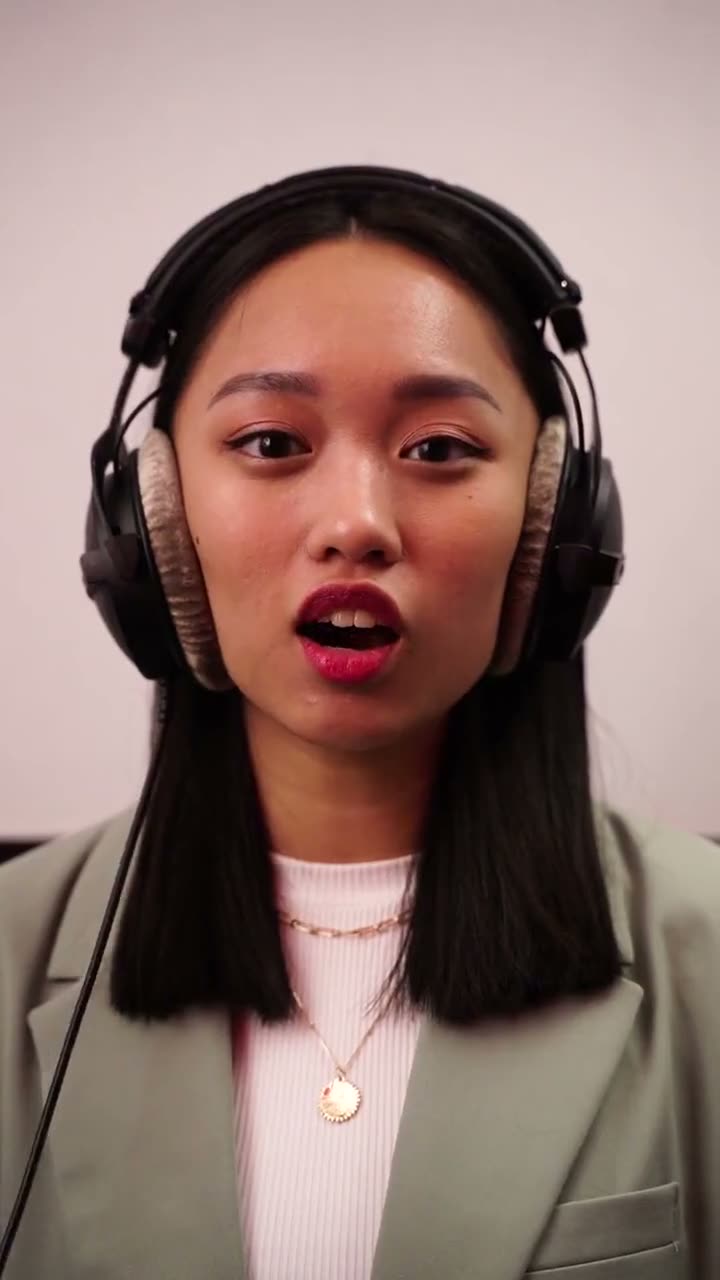
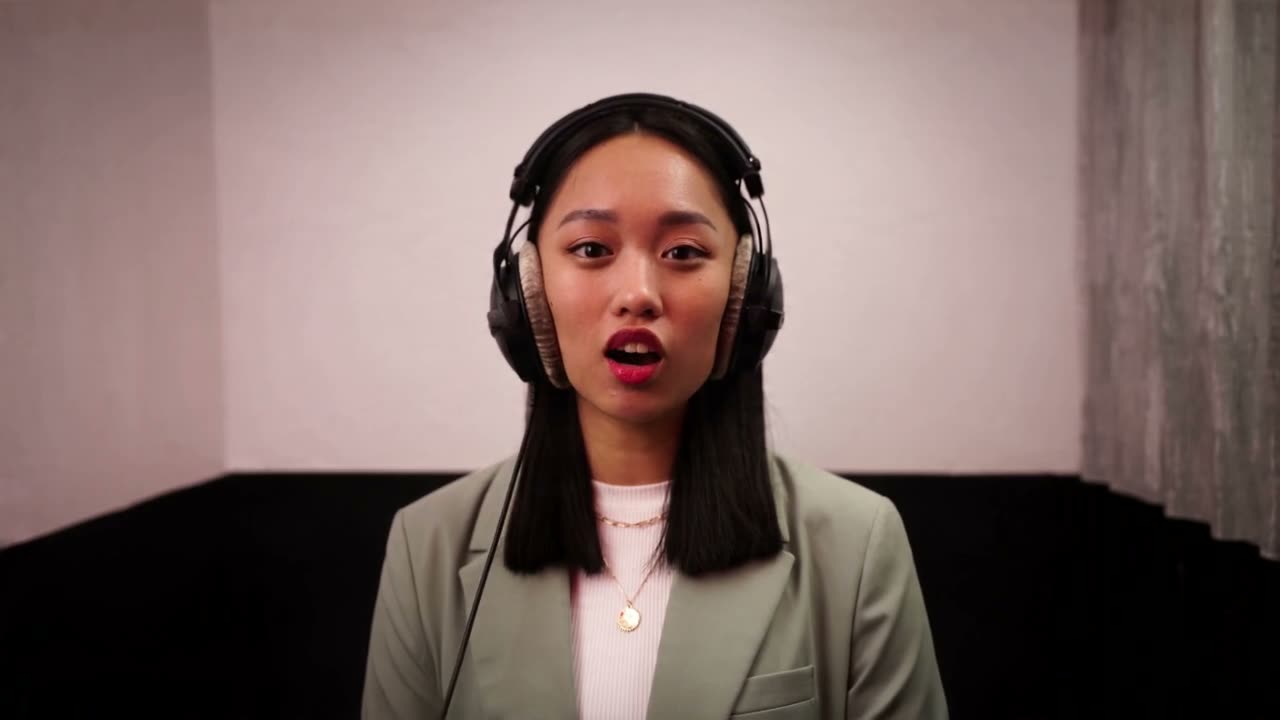
Change a video's aspect ratio without black bars or cropping
Upload an MP4 or MOV clip (up to 60 seconds and 95 MB) and pick the shape you need. The AI keeps your original frame untouched in the middle and generates new picture around it, frame by frame, so a 9:16 phone video becomes a full 16:9 widescreen video with no black bars and no blurred copy behind it. You get an MP4 at 720p or 1080p with your clip's own sound, usually in 1 to 3 minutes.
- You need
- One video clip, MP4 or MOV, up to 60 seconds and 95 MB. Nothing else: no prompt needed, no editing.
- Which clips
- Your own clips, or clips you have the right to edit. No sexual content.
- You get
- The same clip in the new shape (16:9, 9:16, 1:1, 4:5, 5:4), as an MP4 up to 1080p, with your clip's original sound copied over, nothing added, no watermark, usually in 1 to 3 minutes.
- Price
- Up to 10 seconds at 720p is $4.99 for that one clip, one payment, no subscription. With credits it uses 20 credits (credits from $12.99).
- Refund
- If a run fails, its credits come back automatically. Edges that come out clearly broken: email us within 7 days and we redo it once or give back what it cost.
- Limits
- The AI invents what was outside the frame, so it can't show what really was there: a person cut off at the edge gets a made-up rest of their body, and signs or faces that only appear in the new area are made up too. Fast camera moves and busy edges can shimmer. Up to 60 seconds per clip; trim a longer one to the part you need first.
What is an AI Video Expander?
Video outpainting is image outpainting (Photoshop's Generative Expand, DALL-E's uncrop) done on every frame of a video, so the new edges move with the camera and stay the same from frame to frame. Editors used to fill the gap with a blurred, zoomed copy of the clip or plain bars; AI video models can now draw the room, sky or street that the camera didn't catch.
What the AI does
- Your clip stays in the middle, untouched
- New picture is painted on both sides (or top and bottom)
- The edges follow the camera from frame to frame
Clips that expand best
Clips filmed on a steady camera with a simple background expand best. Fast pans, crowds at the very edge of the frame and text that runs off the side are the hardest.
Where it helps
Posting a vertical clip to YouTube, or a widescreen clip to TikTok or Reels? Expand it to the platform's shape first, so it fills the screen instead of sitting between bars. Common jobs:
- 9:16 to 16:9 for YouTube
- 16:9 to 9:16 for TikTok and Reels
- 16:9 to 4:5 for the Instagram feed
How to expand a video with AI
How it works →- Upload your clip
Upload one clip. MP4 or MOV, up to 60 seconds and 95 MB. No sign-in, no password and no app: drop an MP4 or MOV on this page.
- Pick the new shape
16:9, 9:16, 1:1, 4:5 or 5:4, at 720p or 1080p. You see the price before you pay.
- Download
Your MP4 is ready in about 1 to 3 minutes in My videos, with your original sound and no watermark.
How much does it cost to expand a video?
Pay for one clip, or buy credits once: they never expire, and failed runs give them back. Or subscribe from $9.90/month
One clip, paid once
Prices at 720p; 1080p costs twice as much. A clip is priced at the shortest length that fits it. No subscription.
Credit packs, for several clips
Starter
$12.99
⚡ 60 credits
$0.217 per credit
About 3 clips of up to 10s at 720p
Plus
$24.99
⚡ 140 credits
$0.179 per credit
About 7 clips of up to 10s at 720p
Creator
$59.99
⚡ 400 credits
$0.15 per credit
About 20 clips of up to 10s at 720p
AI Video Expand FAQ
Is this just a crop or a blurred background?
No. Nothing is cut off and nothing is blurred: your whole original frame stays in the middle, and the AI draws new picture around it, frame by frame, that matches the lighting and moves with the camera.
How long can my video be?
Up to 60 seconds per clip, MP4 or MOV, up to 95 MB. The whole clip is expanded, and the price goes by its length: up to 10, 20, 30 or 60 seconds. Trim a longer video to the part you need before uploading.
Does it keep my video's sound?
Yes. The sound of your clip stays on the expanded video as it was; nothing is generated or added. Clips without sound come back silent.
Is there a free version or a watermark?
There is no free try: each clip is paid before it is made ($4.99 for up to 10 seconds at 720p), and the video you pay for has no watermark. The samples on this page show real results from the same settings.
How long does it take?
Usually 1 to 3 minutes for a 10-second clip, longer for a minute-long one. It starts as soon as you pay; there's no free queue to wait in. You can close the page; the video waits in your account.
Can it make my video longer?
No. This changes the shape of the picture (adds width or height), not the length. A 10-second clip comes back as 10 seconds.
How do I change a video's aspect ratio without black bars?
Upload one MP4 or MOV clip (no sign-in needed), pick the new shape and quality, then pay for just that clip or use credits (up to 10 seconds at 720p uses 20 credits). Download the MP4 a few minutes later.
Do I need to sign up?
No. Upload your clip and pay for it right away: the result stays in My videos on this browser. Sign in with Google to keep your videos on any device or to buy credit packs.
How long does it take?
Usually 1 to 3 minutes for a clip up to 10 seconds, longer for a minute-long one. The video shows up in My videos as soon as it's ready, even if you close the page.
Is it free?
No. One clip is from $4.99 (one payment, no subscription), or use credits: from $12.99 for 60 credits. Credits are taken only when a clip starts and given back if it fails.
How long do you keep my videos?
Uploaded clips are deleted automatically after 30 days (after 2 days if you never expanded them). Results stay in My videos until you delete them, and you can delete everything from your account at any time. Your clips are never used to train AI models.
What if a video fails?
The credits go back to your balance automatically and you can try again. Edges that came out clearly broken? Email us within 7 days and we'll redo it once or give back what it cost.
Do credits expire?
No. Credits you buy never expire.
Can I cancel my subscription?
Yes, any time from My videos. It stops at the end of the period you paid for, and you keep your credits.
Can I give credits to a friend?
Yes. Turn any number of your credits into a gift link, or buy a pack as a gift. Your friend signs in, opens the link, and the credits are theirs.
How do I pay?
Checkout is run by Stripe: card, Apple Pay, Google Pay and, depending on your country, local payment methods. Prices are in US dollars, or in euros with the same figures in the euro area; checkout can also show your local currency.
Is AI Video Expand an app, or part of CapCut or Runway?
No. AI Video Expand is an independent website, not made by or affiliated with CapCut, Runway, Adobe or TikTok. There's no app: you upload a clip in your browser and get the expanded MP4 back. It makes the picture wider or taller, not the video longer.
AI Video Expander guides
- How to turn a vertical video into horizontal without black bars or blur
- How to remove black bars from a video by generating the missing picture
- How to turn a TikTok (9:16) into a YouTube video (16:9) without cropping
- How to make a horizontal video vertical (9:16) without cropping people out
- Can you expand a video with AI for free?
- AI video expanders compared
- Can ChatGPT expand a video or change its aspect ratio?
- Video expander or video extender: wider picture or a longer video?
- AI video expand not working? Fixes
Expand your video
One clip in, the same clip in a new shape out. No black bars, no blur, no app.